Debugging log
My cameras were eating the 2.4GHz band
Nest Hubs randomly dropping off WiFi and refusing to reconnect; an Apple TV on the same 2.4GHz IoT SSID stuttering while streaming from a local Plex server
UniFi cameras streaming 143 GB/day of video over 2.4GHz, pinning channel 1 at 95% airtime and starving every other client of transmit opportunities
For months I was convinced I had a Nest Hub problem. Then, separately, an Apple TV problem. I googled Nest Hub disconnect threads, moved the hubs around the house, factory reset them, even repositioned my access points. None of it helped, because none of it was the problem. My UniFi cameras were streaming 143 GB a day over 2.4GHz, pinning the channel at 95% airtime utilization, and every other device on that band was being starved of transmit opportunities.
The Nest Hubs weren’t broken. They just couldn’t get a word in.
Two symptoms that looked unrelated
The first symptom was the Nest Hubs — randomly dropping off WiFi and refusing to reconnect. Classic flaky-IoT behavior, and Nest Hubs have a reputation for being flaky on WiFi, so I treated it as a Nest problem.
The second symptom was the Apple TV, which for some reason had ended up on the 2.4GHz IoT SSID, struggling to stream from my Plex server — over the local network. I did not connect the two. Why would I? One’s a Google smart display being weird, the other’s a streaming box being slow.
I also had a hypothesis I liked too much: the IoT SSID had UniFi’s “Enhanced IoT Connectivity” setting enabled, and maybe that was somehow causing the drops. This had the causality exactly backwards — Enhanced IoT exists to make UniFi more tolerant of dumb IoT devices, not less. It’s the fix for disconnect problems, not the source of them. I was pattern-matching on “setting I remember toggling” rather than thinking about what the setting does.
The trigger
I had two UniFi G6 cameras on the 2.4GHz IoT SSID and added a third. The new one suffered constant dropouts. That finally got me poking around the UniFi dashboard properly — where I found airtime graphs I didn’t know how to interpret. So I took screenshots and handed them to Claude, which is how the rest of this debugging session went: me pulling data, Claude reading it back to me.
Reading the actual event instead of guessing
The first genuinely useful move was pulling the CEF disconnect event for one of the Nest Hub drops instead of changing settings blindly. Trimmed to the fields that matter (MACs redacted, addresses and SSID names swapped for publication):
CEF:0|Ubiquiti|UniFi Network|10.2.105|401|WiFi Client Disconnected|2|
UNIFIlastConnectedToDeviceName=Upstairs U7 Pro XG
UNIFIclientAlias=Google-Nest-Hub-Max
UNIFIclientIp=192.0.2.70
UNIFIwifiChannel=1
UNIFIwifiChannelWidth=20
UNIFIwifiName=Sumatra
UNIFIwifiBand=ng
UNIFIwifiAirtimeUtilization=95
UNIFIwifiInterference=5
UNIFIlastConnectedToWiFiRssi=-59
UNIFIduration=1h 24m
UNIFIutcTime=2026-04-21T03:17:29.762Z
Read the three numbers together:
- RSSI −59 dBm — healthy signal. Not a coverage problem.
- Interference 5% — quiet neighborhood. Not a noise problem.
- Airtime utilization 95% — the channel is saturated. There’s the problem.
Nothing was wrong with the signal. The channel was simply full, nearly all the time, and a client that can’t win transmit opportunities eventually gives up and drops.
Finding the airtime hog
Next question: full of what? The per-radio stats answered it immediately:
| AP | Band | Channel | Clients | 24h data | Avg. airtime |
|---|---|---|---|---|---|
| Upstairs AP | 2.4 GHz | 1 (20 MHz) | 11 | 143 GB | 82.1% |
| Upstairs AP | 5 GHz | 124 (160 MHz) | 8 | 19.3 GB | 3.1% |
| Garage AP | 2.4 GHz | 11 (20 MHz) | 5 | 353 MB | 40.6% |
| Outdoor AP | 2.4 GHz | 6 (20 MHz) | 7 | 77.9 GB | 65% |
The channel plan itself was fine — 1/6/11, 20 MHz, properly spread. But 143 GB of 2.4GHz traffic in 24 hours is not IoT chatter. That’s bulk video. The cameras — which I’d left on the 2.4GHz IoT SSID because “cameras are IoT” — were streaming continuously into a band that was never designed to move that kind of sustained throughput. Meanwhile the 5GHz radio on the same AP sat at 3% airtime, essentially idle.
The fix: split the SSID, not the VLAN
The obvious move — turn off Enhanced IoT so the existing SSID could use 5GHz — would have traded one problem for another. Enhanced IoT is what keeps the genuinely dumb 2.4-only devices (smart plugs, bulbs, a noise machine) connecting reliably. Turning it off globally to help the capable devices rolls the dice on every legacy device I own.
So instead: a second SSID, on the same IoT VLAN.
Reserve— 5GHz only, WPA2 (not transition mode), PMF disabled, Enhanced IoT off, BSS Transition on, fast roaming off. Same VLAN as the 2.4GHzSumatraSSID, same firewall rules, same everything at L3. It’s purely a wireless-layer split: capable devices get clean airspace, legacy devices keep their compatibility crutches.- Same passphrase as the original SSID — reusing it adds no new exposure when both SSIDs land on the same VLAN, and it saves re-typing a long password into devices via touchscreen.
One tradeoff worth naming, because later in this post I call cameras the highest-value target on a home network: WPA2 with PMF disabled means management frames are unauthenticated, so anyone in radio range can spoof a deauth and knock a client offline. For a smart plug, nobody cares. For a camera, an availability attack is exactly the attack worth mounting — which makes “PMF disabled for compatibility” a deliberate tradeoff, not a free choice. It’s one more reason the camera-VLAN item below hasn’t left the list.
Then I migrated all three cameras over, one first as a canary, then the other two.
The cliff
This is the upstairs AP’s 2.4GHz radio over the 24 hours spanning the migration. The moment the cameras left the band is not hard to find:
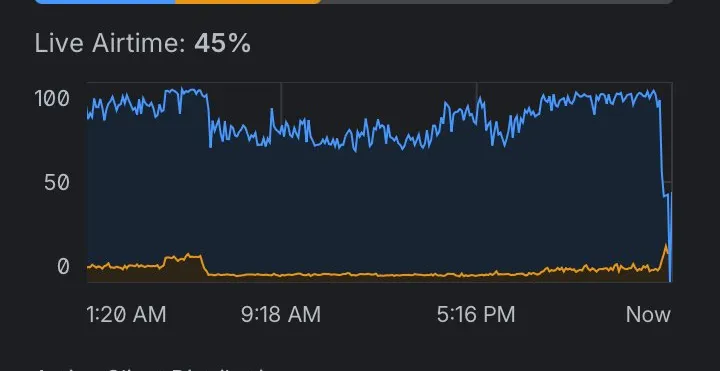
Eighty to a hundred percent utilization all day, then a near-vertical drop to 15–20% at the migration, settling around 40–45%. It’s the cleanest before/after graph I’ve ever produced on my own network.
The part that confused me: interference went up
After the migration, the same radio’s interference and TX-retry numbers increased. That looked alarming until I understood what the two metrics actually measure:
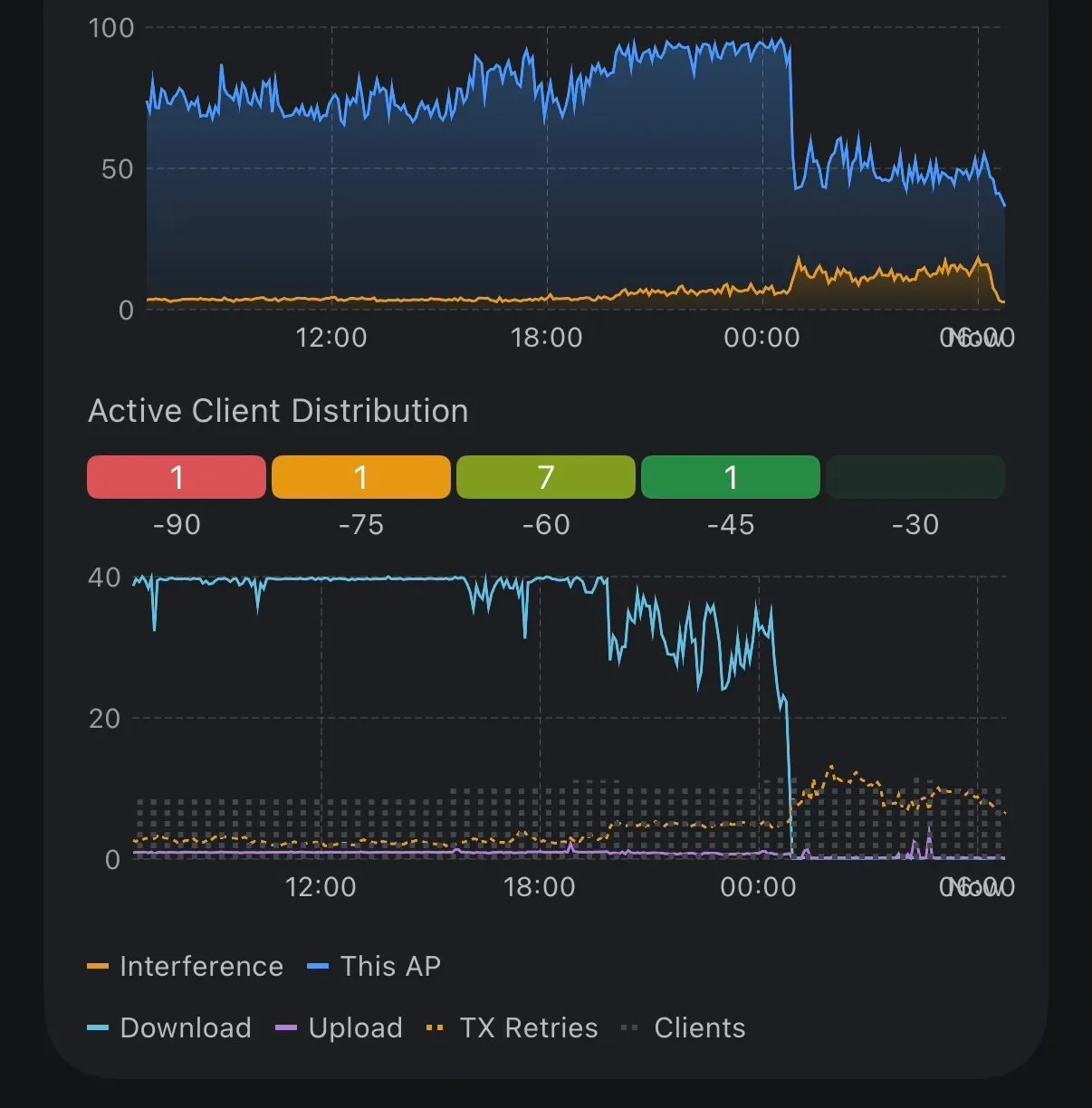
- Airtime utilization is how much time the channel is busy with anything at all — your traffic, neighbors, noise.
- Interference is the share of that busy time that isn’t yours.
When the cameras dominated the channel, my own traffic was so loud that neighbor networks and background noise were a rounding error — reported as 5% interference. Remove the cameras and the noise floor didn’t change at all; it just became a bigger share of a much quieter channel. Same with TX retries: the distant, low-power IoT stragglers were always retrying, but they used to be a tiny fraction of total transmissions. Stop the band at a concert and you suddenly hear the AC hum and the guy coughing in row 12. The hum was always there.
The absolute numbers were all healthy — around 40% airtime, ~10% interference — and the real test was whether clients stayed connected.
What I deliberately didn’t do that night
By this point it was 1am and I’d made two changes (new SSID, camera migration). Everything else went on the weekend list, on the principle that a third simultaneous change means you can’t attribute either success or breakage:
- Move the Nest Hubs to the 5GHz SSID too — only if the drops continued.
- Drop the 5GHz radios from 160 MHz to 80 MHz. Channel 124 is DFS territory, and a radar hit on a 160 MHz channel kicks every client while the AP rescans. Latent risk, not the active problem.
- Put the cameras on their own VLAN. Cameras are the highest-value target on a home network and only need to reach the Protect controller; they’ve earned stricter isolation than a smart bulb. But VLAN surgery at 1am is how you wake up at 3am to a broken network.
One follow-up did surface immediately: a camera now on 5GHz reported −72 dBm, which UniFi Network rated “good” and UniFi Protect rated “poor.” Protect is right. Its scale is calibrated for sustained video throughput, not “a smart plug would be fine here.” 5GHz trades range for speed, and a camera that was comfortable on 2.4GHz can land in marginal territory after the move.
Three months later
The Nest Hub disconnects stopped entirely. Not reduced — stopped. I never even needed to move the hubs off the 2.4GHz SSID; once the cameras stopped eating the channel, the hubs were fine exactly where they were. Here’s the same Hub Max from the CEF log above, checked while writing this post:
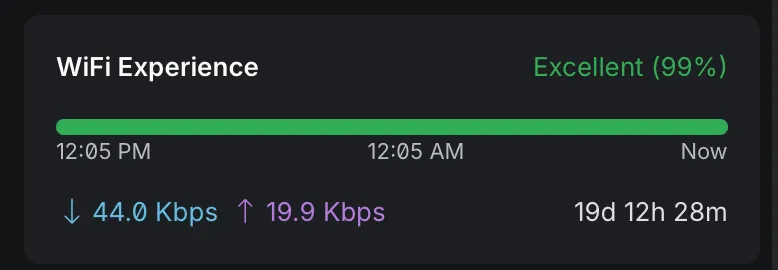
Nineteen days of uptime on a device that used to drop every hour or two.
The Apple TV got moved to the main network’s 5GHz SSID, where it should have been all along, and the Plex stuttering vanished with it. The weekend list got worked through too — the garage AP’s 5GHz radio now runs 80 MHz on channel 48, off DFS entirely — and I’ve since relocated a couple of APs, so today’s channel map no longer matches April’s. The Nest Hub outcome held through all of it.
Takeaways
- Two flaky devices on the same band is a band problem until proven otherwise. I debugged the Nest Hubs and the Apple TV as separate device problems for months. They were one problem wearing two costumes.
- Read the disconnect event before changing settings. One CEF log line — healthy RSSI, low interference, 95% airtime — pointed at the answer more precisely than any amount of setting-toggling.
- Airtime, not signal strength, is the metric nobody checks. Every WiFi troubleshooting guide says “check your signal.” Mine was −59 dBm and perfect the whole time.
- Continuous video does not belong on 2.4GHz. If a device is dual-band capable, put it on 5GHz. “Cameras are IoT, IoT goes on the 2.4 SSID” is how I got here.
- A second SSID on the same VLAN is a free tool. No firewall changes, no routing changes — just a wireless-layer split between capable devices and legacy ones.
- Percentages lie without absolutes. Interference “doubling” from 5% to 10% was the network getting healthier.
SSID names in this post are changed — they’re broadcast identifiers, and wardriving databases exist. IPs are from the RFC 5737 documentation range. The graphs are real screenshots from the night, cropped to remove identifiers; the numbers quoted are from the UniFi dashboard as captured at the time.